
Seeing beyond eyesight: A conversation about functional vision and AAC 

Reading Time: 6 minutes

Functional vision isn’t just relevant when vision differences are identified — it affects how all of us use vision in daily life. 

A child may pass a standard eye test but still struggle to find their AAC device in a busy classroom. An AAC user may communicate well at home but suddenly appear distracted, overwhelmed, or disengaged at school. 

Often, these challenges are not about behaviour, motivation, or intelligence. 

They may relate to functional vision — how the brain processes and uses visual information in real-world environments. 

Your ability to use vision is influenced by many factors:  

environment | fatigue sensory load | familiarity | stress cognitive load 

For some people, especially those with neurological differences, visual information is harder to interpret and use. This can impact communication, participation and learning — often in ways that aren’t immediately recognised. 

We spoke with Krish Zlotin, Orthoptist and founder of The Seeing Brain, to better understand functional vision and what it means for AAC. 


What is functional vision?  

Functional vision is how our vision works in everyday life. 

It is more than just seeing clearly. It includes: 

  • understanding what we are looking at 
  • knowing where something is in relation to ourselves and other objects 
  • coping with noise, lighting, movement, clutter and fatigue 
  • using vision while moving, communicating or learning 

For many people, vision fluctuates depending on the environment and how much information their brain is trying to process. 

Functional vision is something we constantly rely on — often without realising it. 

08d59ce9 ed21 4568 9ec1 72ce78413320

Does vision change over time?  

Yes — vision develops through experience and learning. 

image 11

We all start at the bottom of the hierarchy.  

Many people learn visually through watching others and building connections between what things look like, feel like and do. 

For those with vision processing differences, these opportunities may need to be taught more intentionally and repeatedly. 

Vision is highly contextdependent. 
Someone may function well in familiar environments but find unfamiliar or visually complex settings more challenging. 

Factors such as fatigue, illness and sensory load can also impact how vision is used. 

These skills continue to evolve over time as demands increase. 

What are red flags for functional vision impairment?  

A common indicator is when someone has a “normal” eye exam but still struggles visually in everyday life. 

Signs may include: 

  • difficulty finding items in clutter 
  • becoming overwhelmed in busy environments 
  • anxiety or refusal to participate in visually demanding situations 
  • bumping into objects or misjudging steps 
  • fluctuating engagement and attention 
  • visual fatigue 
  • relying on sound, touch or memory rather than vision 

These difficulties are often mistaken for behavioural or attentional differences, when visual processing may be playing a role. 

What is Cerebral Visual Impairment (CVI)? Are there any common myths about CVI?  

Cerebral Visual Impairment (CVI) is a brain‑based visual difference where the brain has difficulty processing and interpreting visual information. 

It is one of the leading causes of childhood vision impairment, yet it remains underdiagnosed. 
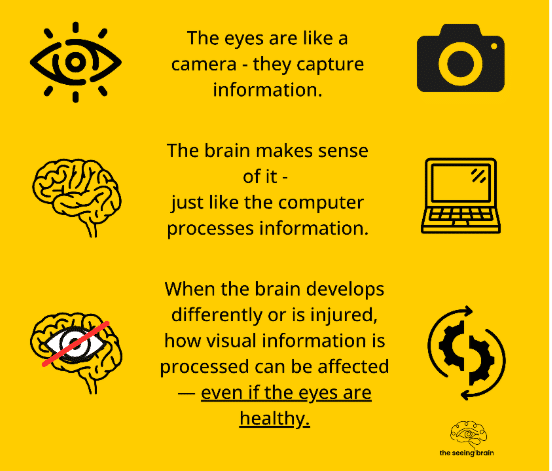
image 9

Vision happens in the brain, not just the eyes

Common myths about CVI 

  • “Their eyes are fine, so their vision must be fine” 
  • “They can see sometimes, so they don’t have a vision impairment” 
  • “They’re just not paying attention” 

When should a functional vision assessment be considered?  

Functional vision differences don’t always present as a clear vision ‘problem’. 

They can look like: 

  • refusal to participate 
  • anxiety 
  • fatigue 
  • inconsistent performance 

For example, someone may engage well in a quiet, familiar environment but struggle in a busy or visually complex setting. 

A functional vision assessment helps identify why someone may be finding certain environments difficult and what supports may help. 
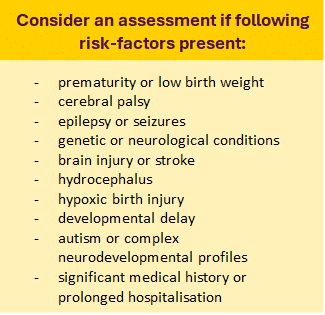
image 12

What should people be aware of when supporting people who have vision difficulties?  

Vision fluctuates based on:  

  • how much information a person is processing,  
  • how familiar the environment is,  
  • and how they are feeling. 

Routine and predictability can reduce visual demand. When something is familiar, less visual effort is needed to recognise and engage with it. 

Reducing competing information can also help. People with vision differences often need fewer distractions and more time to process. 

image 14

Can someone with vision impairment use Eye Gaze technology?  

Yes — but success depends on understanding the individual’s visual strengths and challenges. 

Eye gaze relies on: 

  • fixation and visual attention 
  • scanning 
  • visual fields 
  • processing speed 
  • visual endurance 

For some people, vision can be effortful and inconsistent. 
They may manage simple displays but find more complex layouts or longer use more difficult. 

This is why it’s important to adapt the system to the individual, rather than assuming eye gaze is not possible. 

What are your top tips for supporting people who have vision difficulties?  

  • Expect fluctuations in vision, participation and attention.   
  • Reduce clutter and competing sensory information.   
  • Use consistent routines and environments where possible.   
  • Allow extra processing time.   
  • Schedule visual breaks throughout the day.   
  • Consider fatigue, illness and sensory load.   
  • Keep verbal input calm and simple during visually demanding tasks.   
  • When someone is visually exploring an object or activity, silence can help significantly.   
  • Avoid cheering or excessive talking while someone is concentrating visually — this can unintentionally interrupt visual attention.   

Small environmental changes can have a huge impact on participation and success.

What are the most impactful modifications to an AAC system for someone with vision impairment?  

The most helpful changes are often simple and individualised.  

These may include: 

  • reducing visual clutter 
  • presenting fewer options 
  • increasing symbol size 
  • simplifying backgrounds 
  • improving spacing 
  • using consistent layouts 
  • positioning the device within preferred visual fields 
  • pairing visual and auditory information 

The goal is not just to make things bigger — it is to reduce the amount of visual processing required so the person can focus on communication. 

image 15

What is an Orthoptist?  

Orthoptics is an allied health profession focused on non‑surgical management of eye conditions and visual rehabilitation. 

Orthoptists assess areas such as: 

  • visual acuity 
  • eye movements 
  • visual attention 
  • how the eyes work together 
  • functional and neurological vision 

They often bridge the gap between medical eye care and understanding how vision impacts everyday life, learning and communication. 

What drove you to become an Orthoptist?  

I don’t know what truly drove me to choose Orthoptics at university. But now that I have my own practice, working alongside the families and therapists I support, I feel like I trusted the process and it led me exactly where I was meant to be.  

Over the years, I’ve worked with people of all ages and abilities, although the last four years of my career have focused heavily on paediatrics and neurological vision differences.  

One experience, in particular, reshaped the direction of my work. 

A young boy had been prescribed patching therapy and returned after 12 weeks with no improvement in visual acuity. His MRI results were normal, and he was eventually referred to low vision services. It was during that experience that I truly realised how misunderstood and underserved neurological visual difficulties still are. 

There is still not enough awareness or education around functional vision and Cerebral Visual Impairment (CVI), despite how significantly they can affect a child’s ability to engage with the world around them. 

What I love most is that no two families are ever the same. Even children with similar diagnoses, gestation histories or medical backgrounds can present completely differently and benefit from entirely different supports and strategies. That constantly challenges me to keep learning, thinking creatively, and adapting my approach to the individual in front of me. 

I feel incredibly privileged to do this work and deeply grateful for the families who trust me to be part of their journey.  


What is your favourite part of your job?  

My favourite part is watching things suddenly make sense for families and support teams. 

Often, families know something is different long before anyone can explain why. Once functional vision is understood, many challenges become more understandable. What may have previously been interpreted as behaviour, inattention, anxiety, or refusal can often be understood through a completely different lens.  

I also love how practical the work is. Sometimes small changes can make a significant difference to someone’s ability to engage, communicate and participate more comfortably and confidently. 


Putting this into practice 

Functional vision isn’t always obvious — and it’s rarely one single factor. 

Visual processing, attention, fatigue, environment and experience can all interact at the same time. When vision is considered as part of the picture, it can change how we understand what’s happening and how we provide support. 

For some people: 

  • opportunities for incidental visual learning may be limited 
  • visual information may need to be taught more intentionally 
  • access may improve when environments are simplified 
  • small adjustments (including positioning, clothing contrast, or physical supports like keyguards) can make a difference 

Understanding a person’s vision profile helps guide these decisions — and ensures support is based on what works for them. 

Where to next 

If you’re noticing differences in engagement, participation or visual access: consider  

  • how visual demand might be affecting the situation  
  • look at the environment before changing expectations  
  • allow time to observe patterns across settings. 

If you’d like support to explore what this looks like in practice — including AAC access, visual set‑up, and feature matching — you can connect with your local Liberator Consultant. 

For more on functional vision, including screening tools and further reading, visit: 
The Seeing Brain 

Orthoptics Australia 

Your AAC device is an important part of everyday life, supporting conversations, learning, and connection with others. And, just like any piece of technology you rely on, it performs best when it’s well looked after! In this blog, we’ll share our top AAC device maintenance tips – including practical care, maintenance, and tech advice to help ensure your device stays reliable, responsive, and ready when you need it!

Here are our top tips for your AAC device maintenance.

#1: Clean Your Device Regularly

Let’s face it – devices get dirty. Whether you’re at school, work, or just having dinner, your device comes along for the ride. Give it some cleaning attention regularly to keep it working well.

For light cleaning, use a soft, lint-free cloth on the touchscreen. For deeper cleaning, use a slightly damp, lint-free cloth, then dry the screen with another soft cloth. You can find more detailed cleaning tips in your device manual.

Good to know: Keyguards can go in the dishwasher!

#2: Look After Your Battery

Your device comes with a specific charger – always use that one. Try to charge your battery before it drops to 0%. Charging when your battery is above 10% can extend its life significantly. For best results, charge your device upright at room temperature on a hard surface.

Tip: Turn off your device for faster charging.

#3: Use Sleep Mode and Shut Down Wisely

We encourage keeping your device with you and ready to use for conversations throughout the day. However, there are smart times to use sleep mode or shut down completely.

Set your auto-sleep to five minutes or less. Use sleep mode when you won’t be using your device for short periods, like during swimming.

Remember that sleep mode uses about 2% of battery per hour. Consider turning off your device completely during longer breaks, like overnight.

#4: Avoid Overheating

Like most technology, your device works best when it’s not too hot. Take breaks from heat and avoid charging if your device feels warm. Move to shade or air conditioning rather than trying to cool it with water.

Tip: Keep a low-tech communication board handy for water activities.

#5: Keep Your Software Updated

Software updates bring new features and vocabulary to improve your communication experience. Connect to WiFi and follow the prompts in your settings menu to get these improvements. Updates also help your device run more smoothly overall.

Tip: Plug in your device during updates to protect your battery.

#6: Protect Your Screen

Your screen is essential for accessing all your communication options. Protect it from scratches, moisture, and spills with a screen protector. This also reduces glare and reflections, making it easier to see your buttons.

Visit our online store to see screen protector options for your device.

#7: Consider a Protective Case

Your device is built to be durable and handle daily life. (If you haven’t already), you might try an extra protective case designed specifically for your device model. These cases provide additional security for active use at home and out in the community.

#8: Review Your Access Needs

People change, and your needs change too. It might be time to check that you’re still accessing your device in the most comfortable and efficient way possible.

Connect with your support team (or ours!) to consider adjustments like:

  • Repositioning your device
  • Adjusting your wheelchair setup
  • Trying new vocabulary settings
  • Recalibrating eye gaze (if applicable)
  • Using a keyguard for more accurate selection

Our local consultants are happy to discuss access questions to help you communicate at your best.

#9: When Technical Issues Arise

If you’re experiencing glitches, try restarting your device first – this solves most technical problems.

If you’re still having trouble after a restart, our support team is here to help. Contact us by phone, email, or through our website, and we’ll work together to get your AAC device maintenance issue resolved – and your device running smoothly again.


Need a little support with your AAC device maintenance?

Our team is here to help you make the most of your communication device. Whether you need help with AAC device maintenance or want to explore new ways to optimise your AAC setup, we’re just a call or click away.

Contact us:


What's Next?

Connect with your local consultant to discover your AAC options!

AAC Consultant Lilla
AAC Consultant Delara
AAC Consultant Morgan