
a boy using an aac device with Minspeak® software

Meet Minspeak®: The System Behind Unity®

Reading Time: 4 minutes

Minspeak® is a communication approach that’s been helping people express themselves for over 40 years. It’s the foundation behind many successful AAC systems, including Unity®, and it’s built on a surprisingly simple idea: our brains naturally connect multiple meanings to single images.

a boy using an aac device with Minspeak® software

If you’re exploring communication options or wondering what makes certain AAC approaches so effective, understanding Minspeak® is a great place to start. The principles are straightforward, and the results speak for themselves.

What Exactly is Minspeak®?

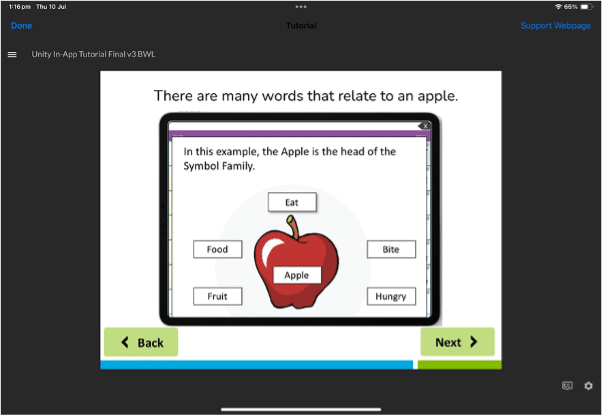
Let’s start with something familiar. When you see a picture of an apple, what comes to mind?

You might think “apple,” but you probably also think “red,” “fruit,” “sweet,” “crunchy,” or even “teacher’s gift.” That’s completely normal – our brains naturally connect one image with multiple ideas.

Minspeak® works exactly like this. It uses pictures (called icons) that represent multiple meanings and combines them in short sequences to create words. So that same apple icon is used to start the sequence, and depending on what other icon comes next, you could say the words “apple”, “hungry”, “eat” or “fruit”
Picture 1

Think of it like a visual language where pictures work together to create meaning.

A Simple Example

Let’s see how this works in practice:

🛏️ (bed icon) might represent multiple messages, like furniture, sleeping, or feeling tired/needing rest.

Picture 2

You can create all these different words by starting with the bed icon and pairing it with another icon.

Why Does This Matter?

Here’s where it gets really interesting. Instead of needing hundreds of different pictures for hundreds of different words, you can use a small set of pictures in different combinations to say almost anything you want.

This means:

  • Less to learn: Master a small set of icons instead of memorising hundreds of pictures
  • Less searching: Icons stay in the same place, so you know exactly where to find them
  • More talking: Spend your energy on conversation, not hunting for the right button

The Magic of Consistency

Here’s what makes Minspeak truly special: once you learn how to say a word, it never changes.

If bed + ‘action man’ (verb key) = “sleep” today, the same sequence will mean “sleep” tomorrow, next week, and next year. This consistency helps your brain develop what we call “muscle memory” for communication.

Just like learning to type or ride a bike, the movements become automatic over time.

Real People, Real Results

Minspeak® has been supporting communication since 1981.

Here’s what makes it work in everyday life:

For beginnersYou can start simple with just one-hit words, then grow into sequences as you get comfortable.
For experienced communicatorsThe same system that works for basic needs also handles complex conversations, storytelling, and even wordplay.
For families and therapistsEveryone can learn the same system, making it easier to support communication at home, school, and therapy.

But I’ve Never Heard of Minspeak®…

That’s okay! You might actually know Minspeak® by other names.

If you’ve heard of LAMP Words for Life®, that uses Minspeak® principles. Many communication devices have used Minspeak systems for decades – it’s just that the technology behind the scenes doesn’t always get the spotlight.

Enter Unity®: Bringing Minspeak® To Your Favourite Devices!

This is where Unity® comes in.

Unity brings all the proven benefits of Minspeak® to your iPhone, iPad, or dedicated communication device, with some exciting modern updates:

What stays the same (the good stuff):

  • Multi-meaning icons that work together
  • Consistent patterns that never change
  • Efficient access to thousands of words
  • Research-backed approach that actually works

What’s new and improved:

  • Available on iOS devices you already love
  • Multiple size options (28, 36, 60, or 84 buttons)
  • Automatic features like automatically creating grammatically correct plural forms though e.g. puppy > puppies.
  • Modern conveniences like word prediction when using the keyboard

How Minspeak® Makes a Difference

Whether you’re new to AAC or have been using other systems, the Minspeak® approach offers something unique:

If you’re just starting out:You get a system that grows with you, from simple requests to complex conversations.
If you love iOS:You get research-backed communication on the platform you prefer.
If you want efficiency:You get access to robust vocabulary without overwhelming complexity.
If you value consistency:You get patterns that make sense and never change.

Getting Started is Easy

Curious to try Minspeak® for yourself? Unity makes it simple:

  1. Download Unity Discover® (completely free) to explore the approach with no pressure
  2. Try the 30-day trial of full Unity if you like what you see
  3. Get support from our team every step of the way

You don’t need to understand everything about Minspeak® to get started – just like you don’t need to understand how a car engine works to drive. The beauty of Minspeak® is that it works intuitively, building on how your brain naturally processes language and movement.

The Bottom Line

Minspeak® isn’t complicated technology – it’s a simple idea that respects how humans naturally think and communicate. After 40+ years of research and real-world use, it’s proven that when we work with our brain’s natural patterns instead of against them, communication becomes easier, faster, and more automatic.

Unity brings this time-tested approach to modern devices, making research-backed communication accessible to anyone who needs it.

Ready to meet Minspeak® for yourself? Download Unity Discover® today and discover why thousands of people have made this approach their voice.

It’s research-backed communication, now in your hands.

Your AAC device is an important part of everyday life, supporting conversations, learning, and connection with others. And, just like any piece of technology you rely on, it performs best when it’s well looked after! In this blog, we’ll share our top AAC device maintenance tips – including practical care, maintenance, and tech advice to help ensure your device stays reliable, responsive, and ready when you need it!

Here are our top tips for your AAC device maintenance.

#1: Clean Your Device Regularly

Let’s face it – devices get dirty. Whether you’re at school, work, or just having dinner, your device comes along for the ride. Give it some cleaning attention regularly to keep it working well.

For light cleaning, use a soft, lint-free cloth on the touchscreen. For deeper cleaning, use a slightly damp, lint-free cloth, then dry the screen with another soft cloth. You can find more detailed cleaning tips in your device manual.

Good to know: Keyguards can go in the dishwasher!

#2: Look After Your Battery

Your device comes with a specific charger – always use that one. Try to charge your battery before it drops to 0%. Charging when your battery is above 10% can extend its life significantly. For best results, charge your device upright at room temperature on a hard surface.

Tip: Turn off your device for faster charging.

#3: Use Sleep Mode and Shut Down Wisely

We encourage keeping your device with you and ready to use for conversations throughout the day. However, there are smart times to use sleep mode or shut down completely.

Set your auto-sleep to five minutes or less. Use sleep mode when you won’t be using your device for short periods, like during swimming.

Remember that sleep mode uses about 2% of battery per hour. Consider turning off your device completely during longer breaks, like overnight.

#4: Avoid Overheating

Like most technology, your device works best when it’s not too hot. Take breaks from heat and avoid charging if your device feels warm. Move to shade or air conditioning rather than trying to cool it with water.

Tip: Keep a low-tech communication board handy for water activities.

#5: Keep Your Software Updated

Software updates bring new features and vocabulary to improve your communication experience. Connect to WiFi and follow the prompts in your settings menu to get these improvements. Updates also help your device run more smoothly overall.

Tip: Plug in your device during updates to protect your battery.

#6: Protect Your Screen

Your screen is essential for accessing all your communication options. Protect it from scratches, moisture, and spills with a screen protector. This also reduces glare and reflections, making it easier to see your buttons.

Visit our online store to see screen protector options for your device.

#7: Consider a Protective Case

Your device is built to be durable and handle daily life. (If you haven’t already), you might try an extra protective case designed specifically for your device model. These cases provide additional security for active use at home and out in the community.

#8: Review Your Access Needs

People change, and your needs change too. It might be time to check that you’re still accessing your device in the most comfortable and efficient way possible.

Connect with your support team (or ours!) to consider adjustments like:

  • Repositioning your device
  • Adjusting your wheelchair setup
  • Trying new vocabulary settings
  • Recalibrating eye gaze (if applicable)
  • Using a keyguard for more accurate selection

Our local consultants are happy to discuss access questions to help you communicate at your best.

#9: When Technical Issues Arise

If you’re experiencing glitches, try restarting your device first – this solves most technical problems.

If you’re still having trouble after a restart, our support team is here to help. Contact us by phone, email, or through our website, and we’ll work together to get your AAC device maintenance issue resolved – and your device running smoothly again.


Need a little support with your AAC device maintenance?

Our team is here to help you make the most of your communication device. Whether you need help with AAC device maintenance or want to explore new ways to optimise your AAC setup, we’re just a call or click away.

Contact us:


What's Next?

Connect with your local consultant to discover your AAC options!

AAC Consultant Lilla
AAC Consultant Delara
AAC Consultant Morgan